

Stock photography can't keep up with enterprise creative demand, and a generic AI image generator just gets you to the same generic look faster. This playbook covers what actually works: directing AI images so they don't read as AI, training custom models on your own brand assets so consistency happens at generation rather than in review, then clearing the legal and disclosure questions before anything ships. It's how Superside builds custom AI image models for enterprise brands.
Every enterprise creative team is running the same math right now, and it doesn't work. Content demand has at least doubled in two years, and Superside's Breakpoint report found 86% of in-house teams already at or beyond capacity, with 70% of creative leaders reporting burnout.
For twenty years, stock photography was the release valve. Need a hero image by Thursday? License one. Need forty variants for a paid social test? License forty. It was never great, but available beat perfect when the deadline was tomorrow.
That trade stopped working. The volume outgrew what any library can supply, and the images you license are sitting in your competitor's campaign. Meanwhile, AI image generation crossed from novelty into production: Adobe Firefly alone generated more than 22 billion assets in two years, and ChatGPT users made 700 million images in a single week.
So the question isn't whether AI can replace stock. It clearly can. It's whether what replaces it is any less generic, any more legally sound and any more useful to your brand.
That's the difference between using AI images and building an AI imagery system, and it's what this playbook is about.

THE PLAYING FIELD
The shift: why stock photography stopped working
The stock photography business is not slowly adapting to AI. It is visibly contracting, and today’s financials say so plainly.
The numbers tell the story
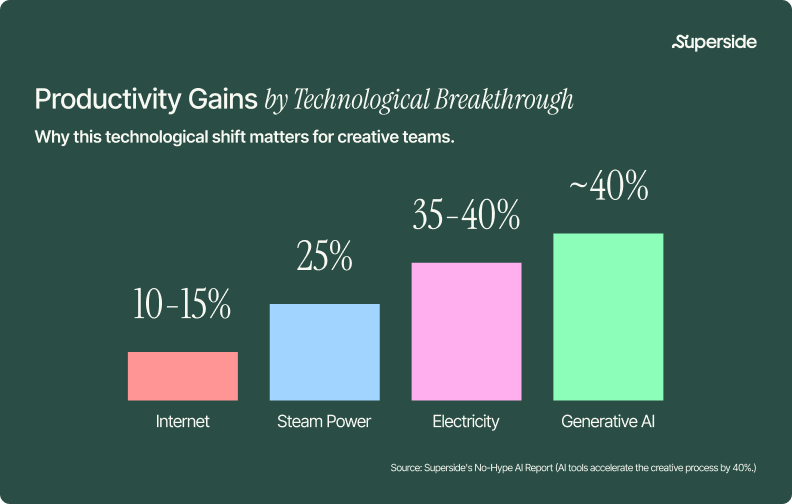
In its second quarter of 2026, Getty Images reported Creative revenue of $127.4 million, down 2.6% year over year, while its Editorial business grew 9.2%. The gap between those two lines is the whole story: demand for the images only a photographer standing in a specific place at a specific time can capture is holding up. Demand for the generic, staged, license-a-handshake catalog is not. Getty's active annual subscribers fell 25.2% to 240,000, and subscriber revenue retention slipped from 93.4% to 88.4%.
Shutterstock's Q2 2026 results were sharper. Revenue fell 17% year over year to $221.8 million. Subscribers dropped from 1,073,000 to 951,000, and paid downloads fell from 112.6 million to 98.7 million. The company posted a $155.9 million net loss, driven largely by a $173.7 million goodwill impairment it attributed directly to the decline in its own fair value following a collapsed deal.
That deal matters. In January 2025, Getty Images and Shutterstock announced a merger valued at roughly $3.7 billion, pitched as the consolidation that would let the category defend itself. It never happened. The UK's Competition and Markets Authority required Getty to divest Shutterstock's global editorial business, and in July 2026 Getty walked away. The two largest players in stock photography spent eighteen months trying to become one company and ended up smaller, separately, than when they started.
Both are now pivoting hard toward AI licensing rather than fighting it. Getty signed a multi-year display partnership with OpenAI in June 2026 to surface its licensed content inside ChatGPT, a deal that pointedly does not cover model training.
The friction was always there. Scale just exposed it.
Even before any of this, stock photography carried real costs that never showed up on the invoice. Search time. Extended license fees for the use case nobody anticipated. Cropping, recoloring and compositing to force an image toward a brand it was never made for. And the quiet, structural problem: every image in a stock library is, by design, licensed to everyone. Originality is not a feature the model can offer.
At low volume, that friction is tolerable. At the volume enterprise teams now operate at, across paid social, display, email, web, OOH, retail, localized markets and constant creative testing, it compounds into a bottleneck. This is the creative debt most teams are carrying without naming it.
Meanwhile, adoption moved. IAB research published in January 2026 found 83% of ad executives say their company has deployed AI in the creative process, up from 60% in 2024. Broken out by format, 85% are using generative AI for social media ads and 73% for display. McKinsey's state of AI research found 71% of organizations now use generative AI regularly in at least one business function, with more than a third using it specifically to generate images.
The market didn't decide stock photography was bad. It decided stock photography was slow, shared and inflexible at exactly the moment those three things became disqualifying.

THE GAME CHANGER
The opportunity: what AI-generated imagery actually unlocks
AI image generation stopped being interesting as a technology somewhere around 2024. What makes it worth a playbook now is what it changes about how creative work gets planned, not just how fast it gets made.
Today’s AI tool landscape
The ecosystem has specialized. There is no longer one best tool, only a right tool per job:
- Midjourney v7. Still the strongest for aesthetic quality, texture and artistic coherence, now with a proper web app rather than the old Discord workflow. Best for creative exploration and mood setting.
- FLUX 2 (Black Forest Labs). The leader in prompt adherence and photorealism, with open-source flexibility that makes it the practical choice for batch production and enterprise pipelines.
- GPT Image (OpenAI). The most accessible, with the best natural-language comprehension. Best for fast concepting and getting a non-designer stakeholder to something they can react to.
- Adobe Firefly. Trained on licensed content with IP indemnification on qualifying enterprise plans and deep Creative Cloud integration. The default when legal safety is the binding constraint.
- Ideogram v3. Best-in-class text rendering inside images, which matters more than it sounds when your assets carry taglines, offers or typographic lockups.
- Google Imagen. Strong photorealism, particularly on human subjects, available through Google Cloud for enterprise-scale deployment.
Most serious teams run two or three of these. A common production pattern is Midjourney for exploration, FLUX for volume, Firefly for anything that needs to clear legal. If you want a deeper breakdown, we've covered the best AI design tools and the AI-powered design platforms worth evaluating.
There's also a real strategic question underneath the tool choice, which we've written about separately: point tools versus an integrated creative platform.
The benefits for brand teams
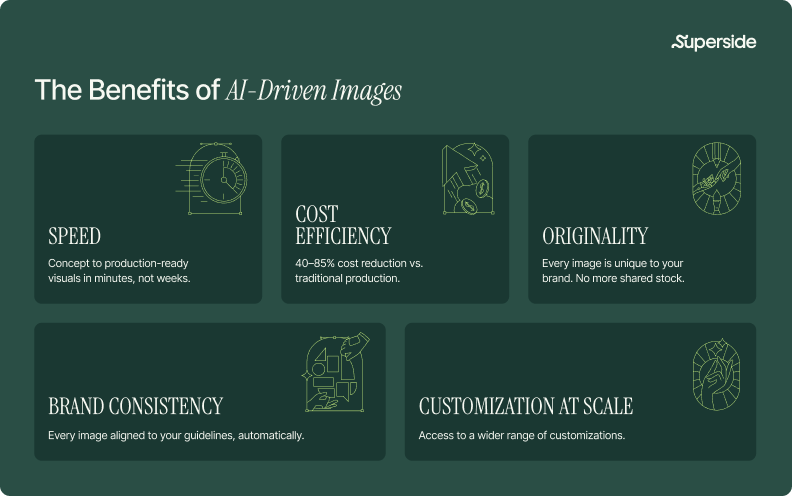
Speed, but the useful kind. The headline version is that sourcing, licensing and customizing collapse from days into minutes. The more valuable version is what that does to the creative process upstream. When generating a concept costs minutes instead of a shoot, you stop defending your first idea and start testing your fifth.
Adobe found 94% of creative professionals produce content more quickly with AI, with most reporting they're at least 50% faster, saving an average of 17 hours a week. That's not 17 hours of output. That's 17 hours of thinking time given back.
Cost efficiency, honestly modeled. Brands consistently report 40 to 85% reductions against traditional production. But the comparison most teams run is too narrow. The real baseline isn't the license fee. It's the fully loaded cost: subscriptions and extended licenses, the shoot days you still run, the agency hours spent adapting assets per market, the internal design time spent on resizing and versioning, and the rework caused by briefs that were unclear the first time.
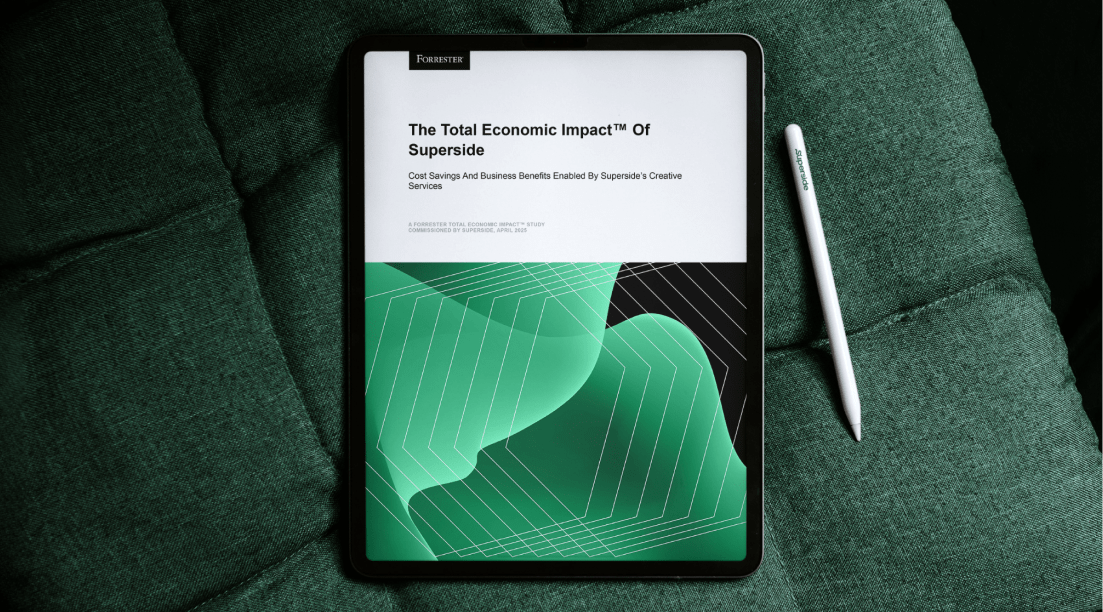
Superside's Forrester Total Economic Impact study put concrete numbers on that full picture, finding a 94% three-year ROI, payback in under six months, $1.9 million in avoided agency costs and 60% fewer review rounds. Review rounds are the line item nobody budgets for and everybody pays.
Originality by default. This is the benefit that gets undersold. A stock image is licensed to everyone. A generated image exists once. For brands in categories where every competitor is drawing from the same three libraries, that alone changes the visual competitive position. It's also why brand consistency at scale becomes achievable rather than aspirational.
Customization at scale. Fifty hero variants for a multi-market A/B test is a Tuesday, not a quarter. This is where AI imagery stops being a production tactic and starts being a performance marketing capability, because creative volume is the input that most reliably moves paid performance.
Brand consistency, when the system supports it. This is the honest caveat. Generic tools do not deliver brand consistency. They deliver plausible images in the general vicinity of your brand. Consistency comes from the system you build around the tool, which is the next chapter.
AI as creative collaborator, not replacement
The most successful teams aren’t shipping hundreds of untouched AI outputs. They're using AI to widen the exploration, then applying human creative direction to everything that reaches a customer.
This is not a philosophical position, it's an observable one. The IAB study found 82% of ad executives believe consumers feel positive about AI-generated ads, while only 45% of consumers actually do. That 37-point gap is what unsupervised AI output looks like from the outside. Craft is the thing that closes it.
At Superside, that principle is structural rather than aspirational. More than 90% of our creative team is AI-certified, so we run 50+ purpose-built AI workflows, and no generative output reaches a final deliverable without human review and client sign-off.
We've written about what that looks like in practice across 500+ AI design projects and how to introduce AI into a creative team without disrupting craft.

The strategy
The craft: how to direct AI images like a pro
Search data says the most common frustration with AI imagery isn't access, it's that the output looks AI-generated. People search for how to make AI images "look realistic," "look real" and "look more realistic" hundreds of times a month. The fix is almost never a better tool. It's better direction.
These principles hold across every major platform.
1. Think like a photographer and an art director
The single highest-leverage change most people can make is to stop describing what's in the image and start describing how it was captured. Lens length, lighting setup, depth of field, film stock, time of day, camera angle. "A product shot with soft studio lighting, shallow depth of field, neutral seamless background, shot on an 85mm lens" outperforms "a nice photo of a product" every time, in every tool.
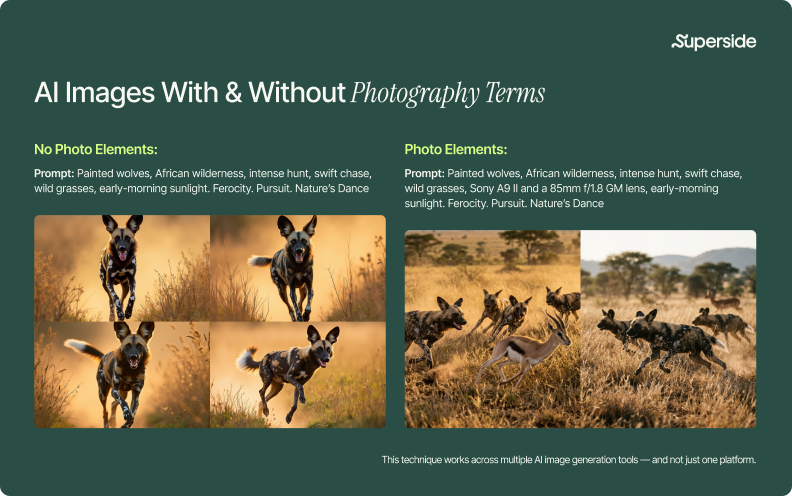
The reason this works is mechanical. These models were trained on captioned images, and the captions that accompanied technically excellent photography contained technical photography language. Speaking that vocabulary points the model at the part of its training distribution you actually want.
2. Be specific and structured
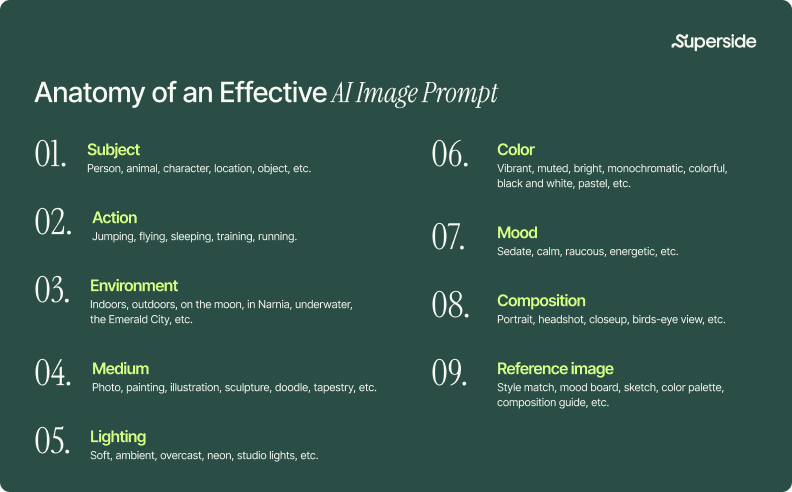
AI tools are literal. Structure your prompt into distinct components separated by commas: subject, action, environment, medium, lighting, color, mood, composition, reference. Choose precise words, since "gigantic" produces more considered output than "big." And avoid negative framing, because "no cake" will frequently still produce cake. Describe what you want present, not what you want absent.
If you want worked examples rather than principles, we maintain running collections of the best Midjourney prompts, AI prompts for logo design and AI prompts for presentations, plus a broader guide to writing better AI prompts.
3. Use reference images, not just words
Every serious tool now supports image references, style references or both. This is the fastest route to brand consistency inside a generic tool, and it's still underused. A mood board, an existing brand asset or a single approved photograph gives the model visual context that no amount of adjective stacking will match. Related and more durable: how to give AI your brand guidelines so it actually follows them.
4. Iterate deliberately, then finish in a real tool
Single-shot prompting is a demo, not a workflow. Professional output comes from generating a spread, selecting the strongest base, then refining: adjusting composition, correcting details, upscaling and polishing in Photoshop or an equivalent. The generation step is the beginning of the process, not the end of it. Our team's breakdown of developing photorealistic AI images and the specific techniques for photorealistic images in Midjourney both walk through this.
5. Build prompt libraries so the knowledge compounds
Teams that scale AI imagery successfully do not start from a blank prompt box each time. They document what worked: proven prompt structures, style references, parameter settings, negative constraints, approved seeds. That library becomes institutional knowledge, and it's the difference between one talented person being good at AI and an organization being good at it. This is a core part of what AI creative workflows and creative automation look like when they're done properly.
6. Put a quality gate in front of everything
Volume without a quality gate is just faster mediocrity. Define what "on-brand" means concretely enough to check against, then check. That includes the unglamorous stuff: hands, text, reflections, logo fidelity, anatomical consistency, repeated faces across a campaign.
We've written a full framework on AI creative quality control that goes past speed as the only metric.
STEPPING UP TO THE PLATE
The advantage: custom AI image models, your brand on demand
Here's the thing nobody selling AI image tools will tell you: off-the-shelf models don't know your brand and can't be taught it through prompting.
You can prompt harder. You can attach references. You can write a 400-word style preamble and paste it every time. You'll get closer, and you'll never get close enough, because the model has no persistent memory of your visual identity. Every session starts from zero. That's not a prompting failure. It's an architectural one.
Custom AI image models solve it at the level where the problem actually lives.
What a custom AI image model is
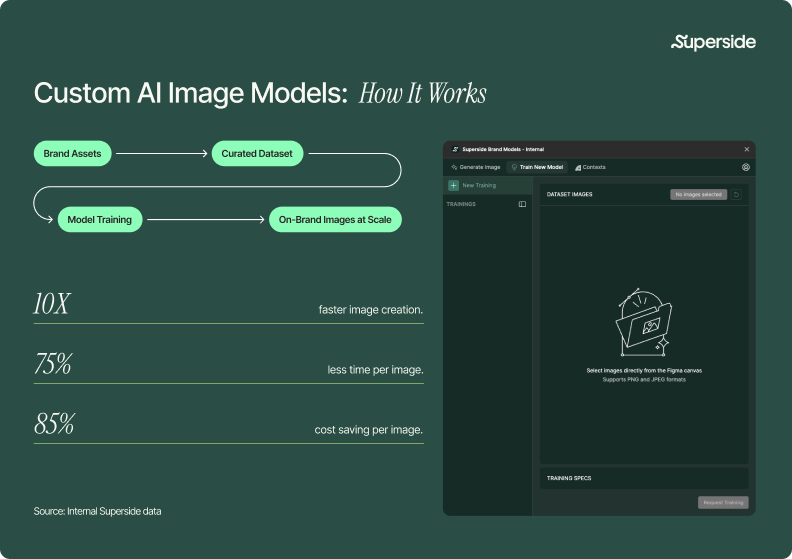
A custom AI image model is a foundation model fine-tuned on your brand's own visual assets. Trained on your photography, illustration style, color behavior, lighting preferences, composition habits and product library, it applies your visual identity automatically, every generation, without anyone needing to remember to ask for it.
The practical consequence is that brand consistency stops being a review-stage correction and becomes a generation-stage default. Instead of catching off-brand output in round three, you stop producing it in round one.
The four model types
- Style models set creative direction: texture, tone, treatment and overall visual feel. Used to build libraries of branded photography and illustration that share a consistent hand.
- Object models produce sharp, accurate product imagery for ecommerce, ads, social and collateral, including SKU variants you'd otherwise reshoot.
- Character models hold a person, mascot or persona consistent across different scenes, poses and contexts, which is the failure mode generic tools hit hardest.
- General models handle multi-purpose generation: hero images, backgrounds, abstract visuals and campaign environments.
What the impact looks like
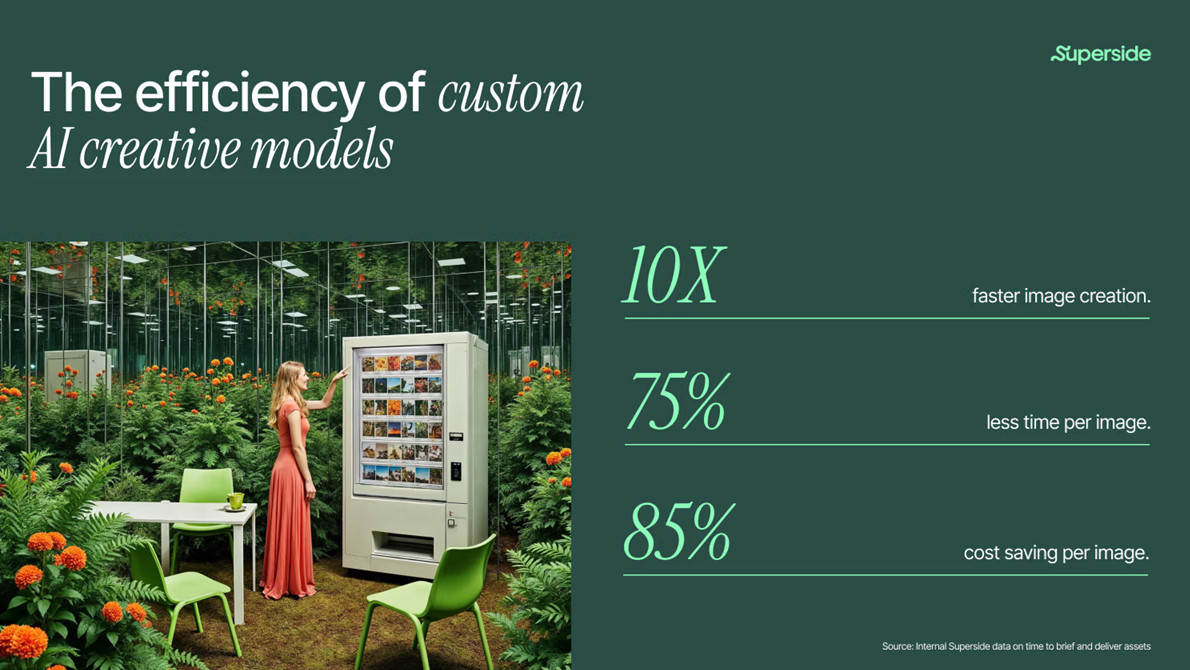
Across Superside's AI-powered project data, custom AI image models deliver:
Plus the one that doesn't fit on a chart: on-brand output by default, not by correction.
How Superside builds them
Curate, don't collect. We start with your visual identity, not your file library, and assemble a training set of 10 to 50+ images chosen for what they teach the model. Curation is where most DIY attempts fall down.

So I would say right now what we are trying to do here at Superside is driving adoption, and adoption means that we have several different initiatives from training to hiring, talent, creating sessions or inspiring people.

Train until it's consistent, not occasional. We train, test and refine until on-brand is the default output rather than the lucky one. More on the mechanics in how to train an AI image model on your brand.
Ship it into Figma. The finished custom model arrives as a Figma plugin, so your team generates unlimited on-brand imagery where they already work. No prompt engineering required.
Keep it private. Every model is privately hosted and accessible only to the client it was built for.
Back it with Brand Brain. Your voice, visual rules, specs, past assets and accumulated feedback feed every brief, generation and review inside Superspace. The model handles what your brand looks like. Brand Brain handles what it means. Both get sharper with every project.

DRAFTING PLAYERS
The proof: how enterprise brands are winning
Principles are cheap. Here's what this looks like in production.
D2L Brightspace: 114 ad variations, 70% faster


EdTech company D2L Brightspace came to Superside needing a campaign to move fast without falling back on generic stock. AI-generated brand imagery was the obvious fit.
The hard part was the first image. Once the core prompt and visual direction were locked, additional concepts and variations were iteration rather than invention. Each image took roughly 15 minutes against the 90 minutes it takes to source, license and customize a comparable stock image.
D2L got standout creative on an unreasonable timeline, all of it on-brand, and early results pointed to one of their strongest campaigns.
Sailun Tire Americas: from stock, to AI, to a custom model
Sailun Tire Americas had leaned on stock and brand photography for years. During a branding workshop with their Superside team, they said what a lot of brands feel but don't articulate: the photography didn't look like anyone in particular. Superside proposed AI image generation.
Rather than pitch it, we proved it. The team mocked up the same project twice, once with stock and once with AI-generated imagery, and put them side by side. The brand team chose the AI version, and that comparison became the turning point for their whole visual approach.
As Sailun's library of refined, approved AI imagery grew, it became something more valuable than a set of assets: it became a training dataset. Using those curated visuals, Superside's AI team built and deployed a custom model that now produces consistent product and lifestyle imagery on demand, delivered as a Figma plugin. The results included up to 85% cost reduction and up to a 90% efficiency gain.
That progression is the pattern worth noticing. Stock, then AI generation, then a custom model trained on the output of the second stage. Each phase produced the raw material for the next.
Goettl: 215 on-brand images, 87% less design time


Home services brand Goettl needed high-quality lifestyle and service imagery at a volume traditional photography couldn't support. Working with Superside's creative team using a combined ChatGPT, Midjourney, Photoshop and Magnific workflow, they generated 215 unique on-brand images and cut design time by 87%, at a quality bar their audience reads as photography.
Maven Clinic: rebranding with a custom model

When Maven Clinic rebranded, it needed fresh, high-quality visuals across a wide range of marketing materials. Traditional photoshoots were too slow and too expensive for the volume the rebrand demanded. Superside built a custom AI image model trained on Maven's new brand style and delivered it as a Figma plugin.
Maven now uses it across nearly all major projects, from decks and social content to multi-page booklets. Photoshoots still happen when a photoshoot is the right answer. The model handles everything else.
Keeping it safe
The guardrails: legal, ethical and authenticity considerations
Speed and cost are easy to sell internally. Legal sign-off is where AI imagery programs stall.
Copyright: what you can and cannot own
In the US, a purely prompt-generated image is generally not protectable. The US Copyright Office concluded in January 2025 that "prompts alone do not provide sufficient human control to make users of an AI system the authors of the output."
The implication isn't "don't use AI." It's that human contribution creates the protectable work. Selection, arrangement, meaningful modification and creative direction can all establish authorship. An image nobody touched is an image nobody owns, and neither can anyone else.
Litigation is still moving. In November 2025 the English High Court largely ruled against Getty in Getty Images v Stability AI, with Getty dropping its primary copyright claims mid-trial. Treat this as monitor-and-mitigate, not settled. Our AI copyright questions, answered, covers the practical version.
Indemnification: your legal team's first question
The difference between AI tools here is contractual, not technical.
- Adobe indemnifies Firefly-generated content on qualifying enterprise plans, backed by licensed training data.
- Getty markets its generative tools with indemnification and perpetual worldwide usage rights.
- Most consumer generators, including several ranking top for "AI stock images," offer no indemnification at all.
Before any tool goes into production, get three answers in writing: what was it trained on, what commercial rights do we receive and who is liable if a third party makes a claim. Custom models trained on your own licensed assets answer all three by default, which is a different conversation to have with legal than "we used a tool on the internet."
Disclosure and provenance
The EU AI Act's Article 50 transparency obligations took effect on August 2026, requiring generative AI providers to mark AI-generated content in machine-readable form. If you operate in the EU, this is no longer a best-practice question.
The infrastructure is arriving with it. The Content Authenticity Initiative has passed 6,000 members, and C2PA Content Credentials now ship in hardware including the Google Pixel 10. Provenance is becoming a default property of images, so the question shifts from "will anyone know" to "what does our record say."
Consumer trust
- 98% of consumers say authentic imagery is essential to trust, and almost 90% want to know when an image is AI-generated.
- 50% of US consumers prefer brands that avoid generative AI in consumer-facing content, and 68% frequently wonder whether what they see is real.
- Only 7% trust a brand more when content is visibly AI-generated. 31% trust it less.
"Visibly" is the operative word. Consumers aren't reacting to AI in the pipeline. They're reacting to work that looks cheap, generic or synthetic, which is what unsupervised generation produces. The craft standard that makes creative effective is the same one that makes it trustworthy.
When not to use AI imagery
A playbook that recommends AI for everything is a sales page. Some jobs still need a camera:
- Real people making real claims. Testimonials, customer stories, employee photography.
- Documentary and editorial. News, events, factual reporting. Exactly why Getty's Editorial revenue grew while Creative declined.
- Regulated claims. Pharma, financial services, food and beverage or anywhere a visual doubles as a substantiated claim.
- Exact product accuracy. When a customer compares the image to the object in their hand, an object model trained on real product shots beats open-ended generation.
Scaling AI creative
The play: from experimentation to operationalized AI
Almost every enterprise creative team has now used AI to make an image. Very few are running on it.
Superside's No-Hype AI Report found that while 96% of creative leaders know AI will speed up creative production, only 2% of in-house teams have genuinely cracked full integration. That's the want-versus-can gap: everyone has been sold AI-first, and almost nobody is getting real AI utilization out of it.
Why building it alone is harder than it looks
The tooling is the easy part. The hard part is everything around it: defining quality standards that hold at volume, building and maintaining prompt libraries, curating training datasets, establishing review and approval workflows, training a team that already has no spare capacity, keeping legal in the loop, and integrating all of it into the DAM, the brand portal and the ticket queue you already run.
That work takes months, and creative demand doesn't pause while you do it. With 69% of creative professionals reporting burnout in the past year, rising to 77% among mid-career creatives, "we'll build it internally in Q3" is a plan that usually turns into a plan for Q1.
A faster path: partnering with Superside
Superside is the world's leading AI-first creative partner. We help in-house marketing and creative teams at brands like Intuit, Amazon, DoorDash, Figma and Reddit scale high-quality, on-brand creative that's built to deliver.
We're not a traditional agency, and we're definitely not a freelance marketplace or another AI tool. We're a human-led, AI-first creative partner: a global team of 500+ top-tier designers, writers, motion artists, videographers and brand strategists across 67 countries, trained to use AI as a creative amplifier and to work as an extension of your team. Your creative team's creative team.
What that means for brand imagery specifically:
- AI-scaled product photography. From single assets to entire image systems: brand-consistent product and campaign imagery, multi-SKU and variant generation, photoreal environments and lifestyle scenes, and catalog refreshes without reshooting. In a controlled visual system you own.
- Custom AI image models. Fine-tuned on your brand, delivered as a Figma plugin, privately hosted.
- AI-readable design systems. Tokens, components, visual rules and constraints expressed in forms AI tools can actually consume, so the system governs the output instead of documenting it.
- Forward Deployed Engineers. Our technical team wires the AI operating layer to your stack: custom brand models, workflows, platform integrations and the operating playbook. Configured, not promised.
- Superspace and Brand Brain. Briefs, reviews, feedback and delivery in one workspace, with a living brand system underneath that gets sharper with every project.
Across 200,000+ projects delivered and more than 12,000 AI-powered ones, AI projects run roughly 35% more efficiently, and the Forrester TEI study puts the return at 94% over three years with payback inside six months.
If you're earlier in the journey, we've also published how enterprise teams operationalize creative ops, a look at AI agents for creative teams, a guide to automated creative production and a rundown of creative automation tools and what to do when they're not enough.
And if you're evaluating partners, our comparison of AI design agencies and AI-powered agencies is a reasonable place to start, including with the competition.
Ready to move from stock to strategic?
Stock photography didn't fail because it got worse. It failed because the job changed. Enterprise brands now need more images, in more formats, for more markets, refreshed more often, and every one of them has to look like it belongs to a single brand.
Generic AI tools solve the volume problem and recreate the generic problem. Custom models, human creative direction and a system that remembers your brand solve both.
See how Superside's AI creative services and custom AI image models can change what your brand's visual content is capable of.
FAQs

Create production-ready AI images
A practical guide for evaluating AI-generated images
for quality, consistency and brand fit.



The data speaks for itself
According to a Forrester Total Economic Impact™ study, Superside delivers a 94% ROI and pays for itself in six months.
Your creative team's creative team
Choose the world's leading AI-powered creative service
and get high-performing ads, videos, experiences and
more at scale, on your schedule and to your standards.
$4.5M+ saved in creative costs in two years
Get real-world examples, results and insights
from over 5,000 GenAI-powered projects.

The real story behind GenAI’s impact on creative
You've heard the hype. But what does the data say?
Harness AI power on creative
Superside’s AI Design Services help enterprises go faster,
reduce costs and deliver high-quality assets at scale.
We'll help you get tomorrow’s possibilities on today’s deadline.