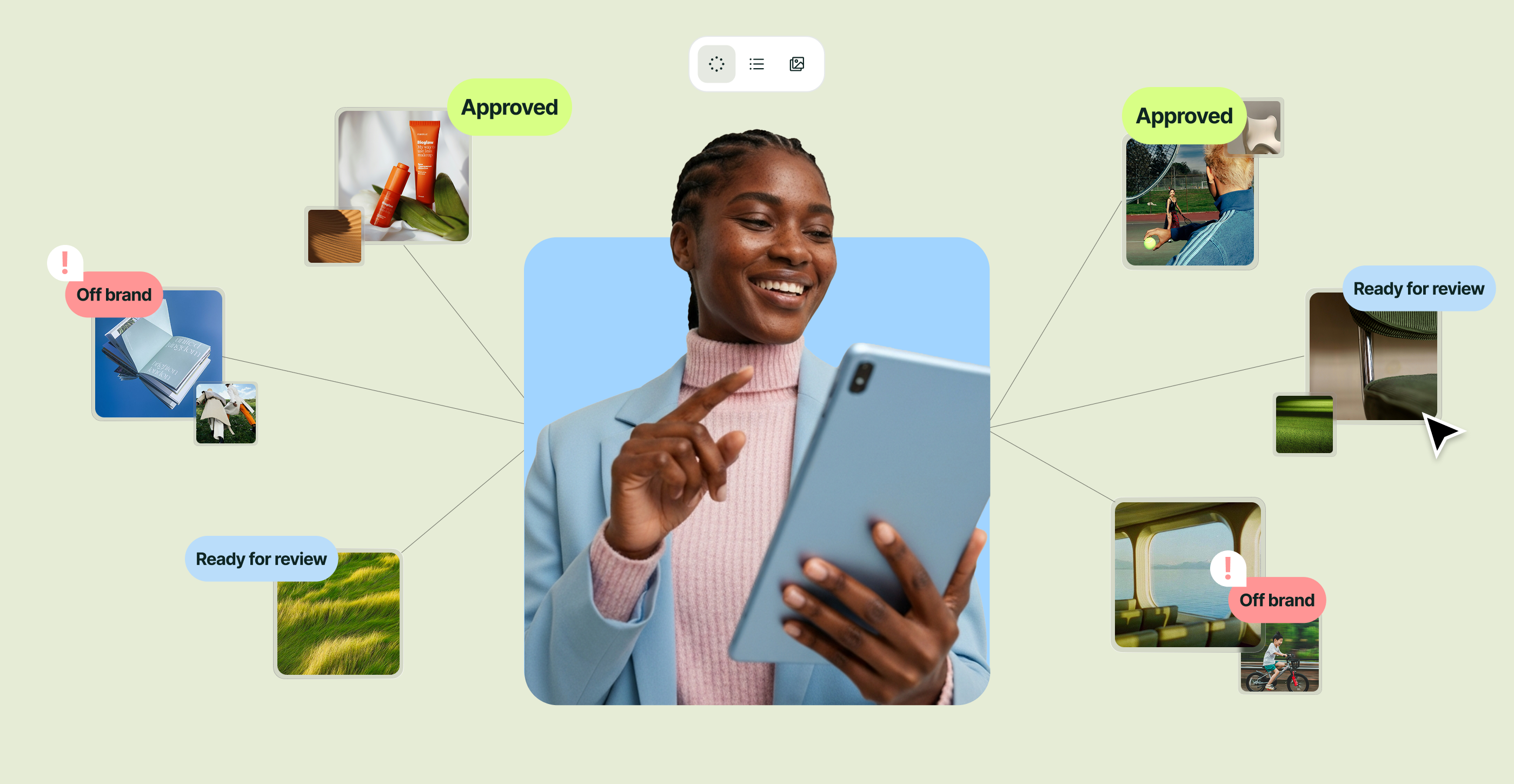



Building an in-house creative operations function from scratch is slow and resource-heavy. Superside’s AI-first infrastructure allows enterprise teams to instantly scale creative output without the operational chaos, utilizing a seamless combination of advanced AI tools and expert human creatives.
Building creative operations in-house works. Many enterprise teams scale their creative output successfully with the right frameworks, tools and phased approach.
But it means hiring the ops team, buying and configuring platforms, building brand intelligence infrastructure and spending multiple quarters reaching operational maturity.
For teams that need creative operations infrastructure now, or want to accelerate what they've already started, Superside offers a different path: an AI-first creative partner with the operational infrastructure already built.
This article walks through what that looks like in practice: what happens when an enterprise team runs a real campaign through the system, from briefing to delivery. The goal is to show what becomes possible when AI-powered creative operations infrastructure is already in place and what you can do to get the most from it.
If you're looking for the foundational framework on building creative ops from scratch, start with Creative Operations 201: How to Build a Creative Ops Function From Scratch.
Scenario: Scaling a global paid social campaign across 40+ variants
Your brand is launching a new product across six markets. Performance marketing needs 40+ ad creative variants across different formats, audiences, messaging angles and platforms.
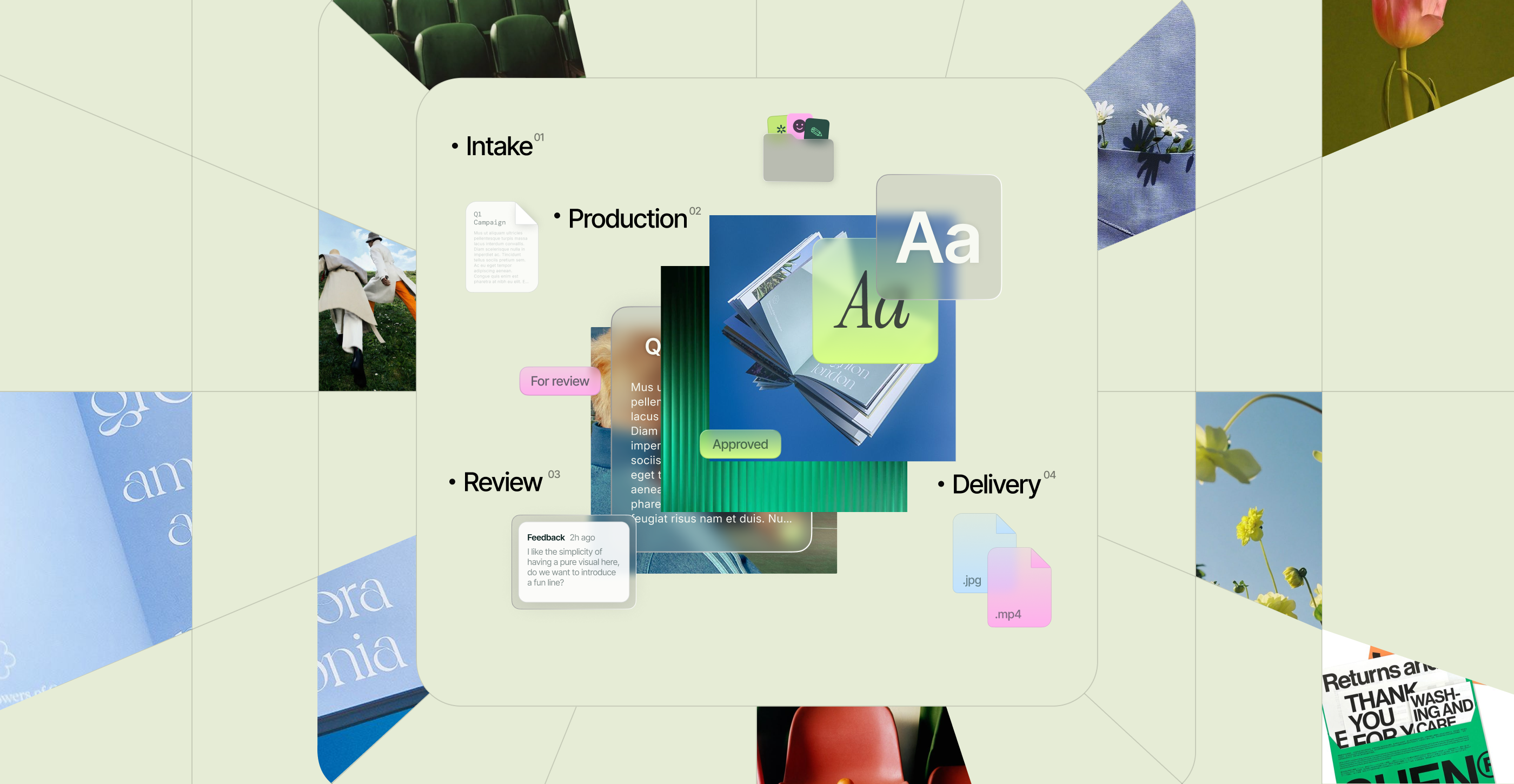
Here's how Superside customers move from request to delivery.
Step 1: Briefing through Superspace
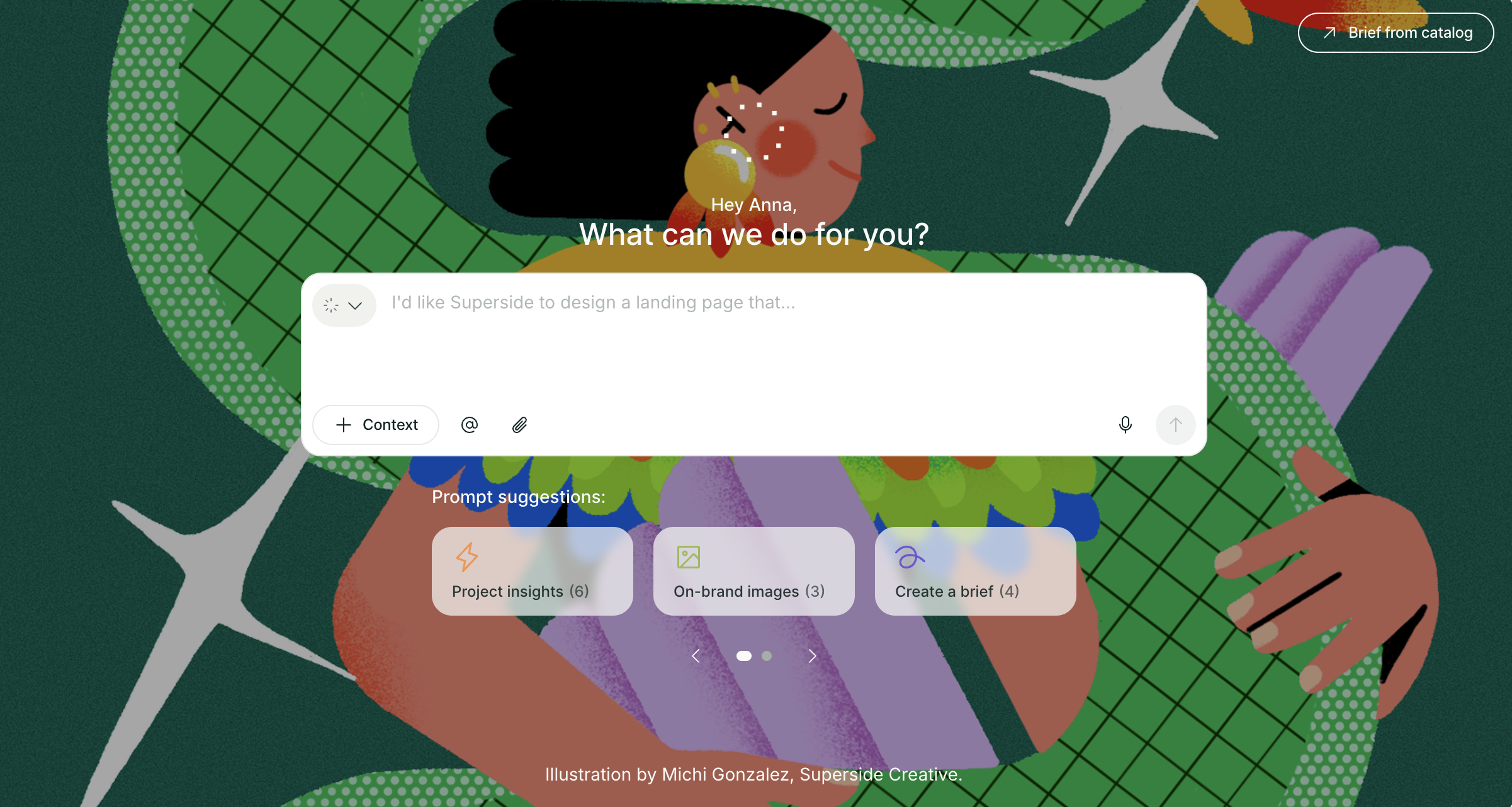
Instead of typing "Hey we need some ads for the product launch" into Slack and hoping someone picks it up, you open Superspace and describe what you need in plain language.
- You type a simple request into the Input Box. Something as straightforward as "we need paid social ads for this product launch." No need to build a formal brief yourself.
- AI Briefing, powered by Brand Brain, builds the brief for you in seconds. It automatically pulls in deliverables, formats, tone guidance, brand standards, relevant past work and known team preferences. The output is a structured, actionable creative brief that replaces the 10 follow-up questions that typically delay project kickoff.
- The creative team gets a strong starting point from day one. Because Brand Brain already knows your brand's guidelines, positioning, visual standards and how your team likes to work, the brief arrives with the right context built in. Fewer follow-up questions, less back-and-forth and faster time to first draft.
- Brand Brain gets sharper with every project. It creates value from day one because Superside builds it using your existing guidelines, positioning, tone of voice and creative standards at the start of the partnership. Over time, it captures nuance that rarely makes it into a formal guideline: recurring feedback, stakeholder preferences and how your team actually likes to work.
The enablement insight: The difference between a good experience and a great one is how much of your creative workflow lives inside Superspace. The more briefs, feedback, reviews and projects that happen on the platform, the more context Brand Brain can learn from and apply to future work.
Step 2: Visual consistency with brand models
With 40+ variants needed, brand consistency is the operational risk. Different designers interpreting the same guidelines differently is how campaigns end up looking like they came from four different companies.
A Brand Model is a custom AI model built on your brand's unique visual style. That could be the brand as a whole, a specific campaign style, a character, a product, or a particular illustration style. Superside builds these behind the scenes. You don't need AI expertise, model-building experience or technical resources to get started.
Early in the process: Direction and alignment. Inside Superspace, Brand Models help teams align on visual direction before production begins. Instead of trying to describe a creative direction in words, teams can actually see it. They generate concepts, explore visual options and create imagery for briefs and presentations.
During production in Figma: Speed and consistency at scale. Because the Brand Model is already built around your specific visual style, the team can generate a large number of on-brand variations from simple prompts. For a 40+ variant campaign, they have an on-brand visual in seconds, which then gets refined and polished by the creative team.
The output for your brand is a set of visuals that all feel connected to the same campaign and brand system. From there, Superside's creatives add any final polish, refinements or production details needed to get assets ready for launch. The goal is to remove a huge amount of manual production work while keeping everything visually consistent.
Step 3: Feedback and revision through Superspace
The campaign is in review. Six stakeholders across three time zones need to weigh in.
In most creative operations setups, this is where things fall apart. Feedback arrives in email threads, Slack messages and PDF markups that nobody consolidates.
Superspace is Superside's creative management platform, and this is where all project collaboration happens. Feedback is centralized, timestamped and asset-specific. Stakeholders comment directly on the assets. Comments are tracked against revision rounds. The project manager and creative team see all feedback in one view, organized by asset and stakeholder.
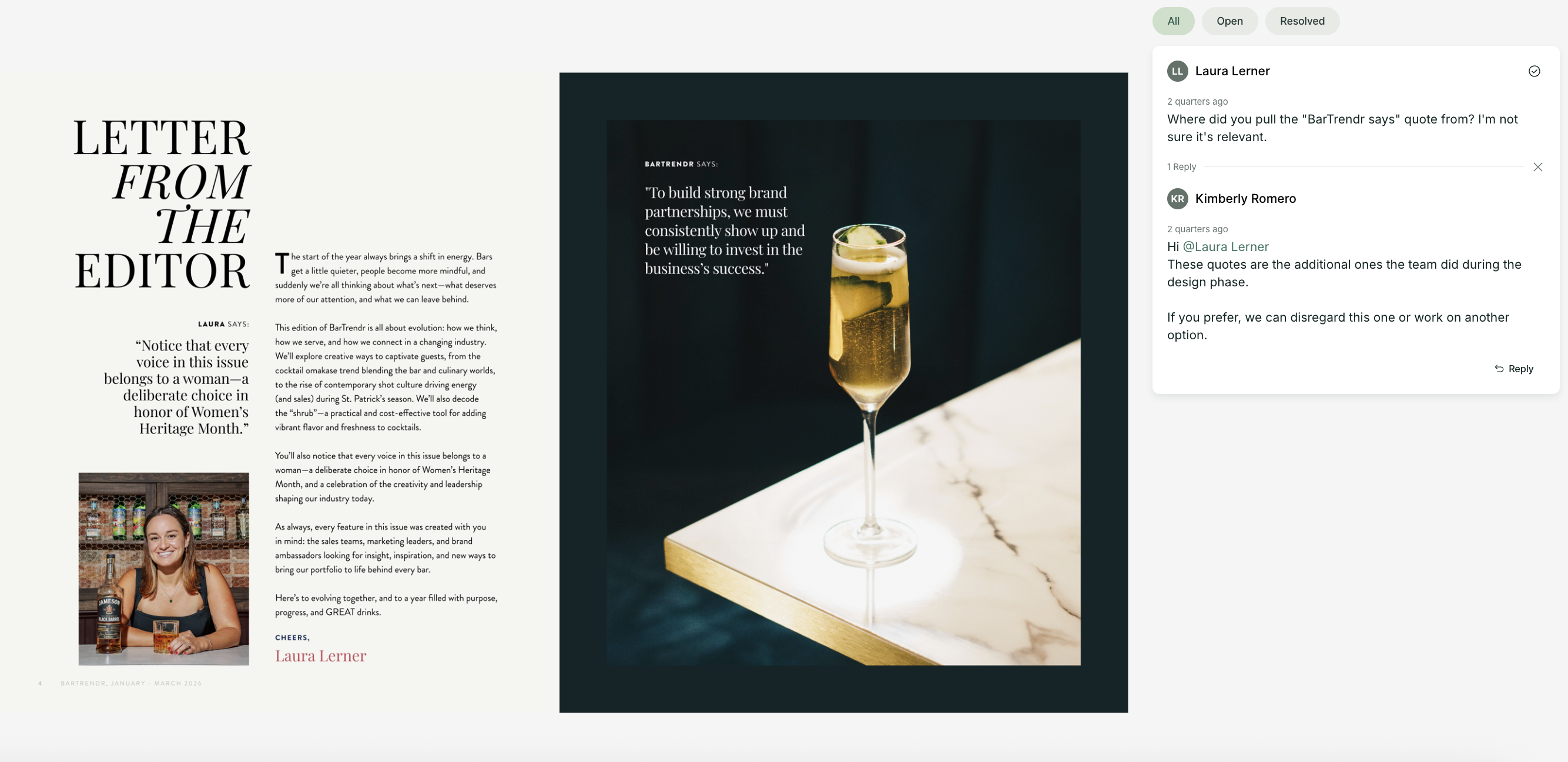
What makes this compound over time: When you provide detailed, specific feedback on creative work, that input updates Brand Brain on your brand's preferences, style sensitivities and quality standards. The more precise your feedback, the fewer revisions you need in future projects. Both the system and the team learn what "right" looks like for your brand.
The enablement insight: If your revision rounds aren't decreasing over time, the fix is usually more specific feedback, not more revision rounds. The strongest customers bring more stakeholders into the feedback process through Superspace. When creative, brand, marketing and product marketing teams are all contributing through the same workflow, Brand Brain develops a much richer understanding of how the organization actually operates.
Step 4: Automating high-volume production
With 40+ variants, a significant portion of the work is production logistics: resizing formats, adjusting copy for character limits, swapping images, localizing content and packaging final assets in correct specs for each platform.
Superside's approach: Identify the repetition, then automate it. Your Superside team builds an approved template, identifies the elements that change across variants (copy, imagery, format, language) and connects those variables to a structured data source. From there, the system generates large volumes of assets automatically while preserving the approved design system and brand standards.
A real example: Superside worked with Booking.com on thousands of personalized partner award assets. By building an automated production workflow, the team delivered 2,800 personalized assets, reduced production time by 85% and cut the cost per asset nearly in half. All while maintaining brand consistency across every output. (For a deeper look at how creative automation works at this scale, see the Storyteq case study.)
The enablement insight: If you're producing the same type of asset repeatedly with minor variations, that's a conversation worth having with your Superside team. They can identify where automation fits within your existing workflow and help you understand what's possible without requiring any technical work on your side. The creative thinking, template design and quality control still happen. What gets removed is the repetitive production work.
As organizations scale their operations across multiple software vendors, they also rely on Zenskar (billing software) to automate subscription billing, invoicing, and revenue operations, helping finance teams keep pace with operational growth.
How AI and humans actually work together at Superside
A common misconception is that AI handles production while humans handle strategy. In reality, AI supports the creative process from start to finish.
It helps teams explore more creative directions, generate concepts faster, create variations and remove repetitive work that slows projects down. In many cases, some of the biggest gains happen before production even begins. AI helps teams visualize ideas, align on creative direction and get to stronger concepts faster.
Throughout the process, the creative team remains deeply involved. AI generates options and accelerates execution, but experienced creatives still guide the work, refine the details and make the judgment calls that ensure the final output is on-brand and effective.
The best way to think about it: AI expands what's possible. The creative team decides what's worth pursuing. Less about replacing steps in the workflow and more about helping talented people move faster without sacrificing quality.
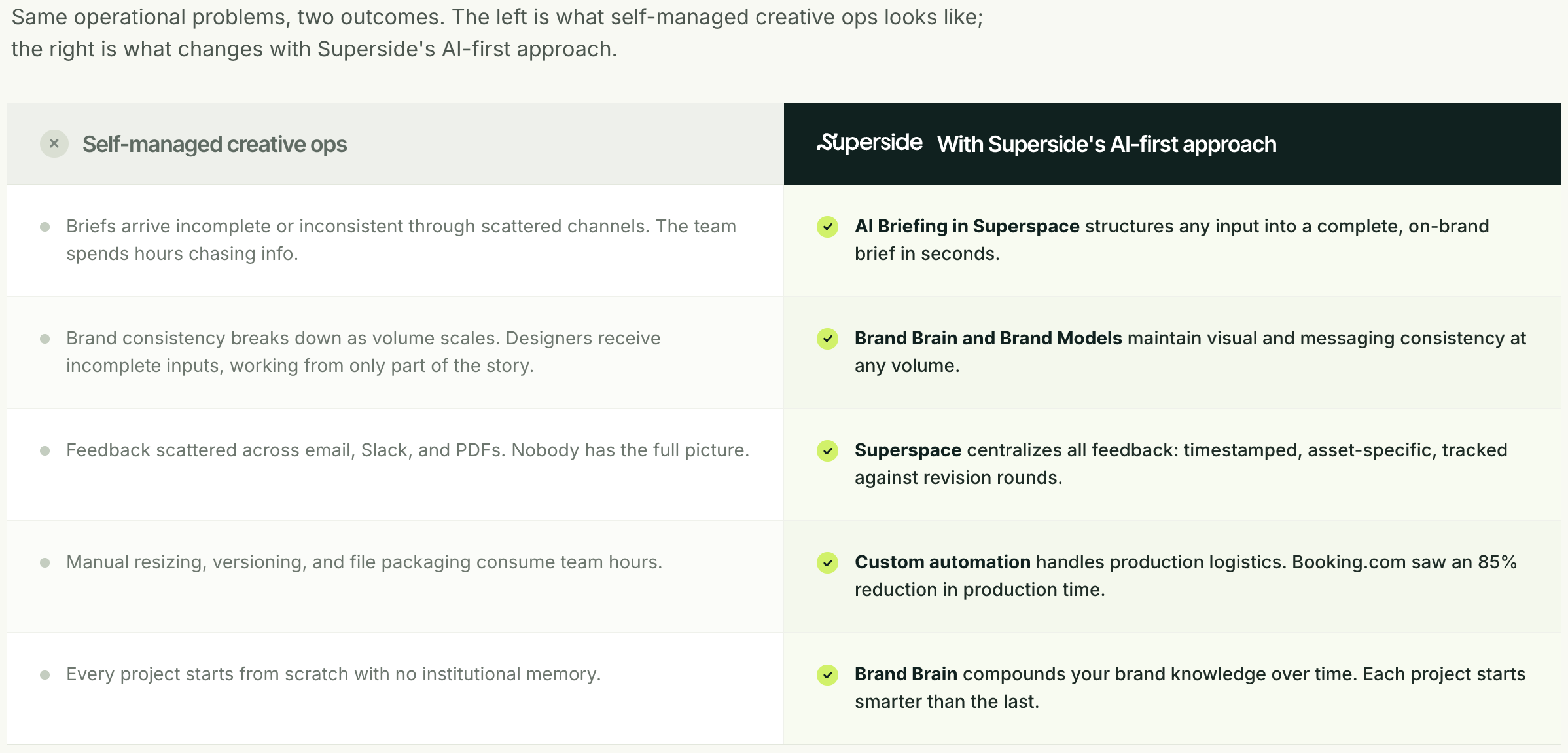
Self-managed creative ops vs. Superside's AI-first approach
What the best Superside customers do differently
Based on patterns across Superside's enterprise customer base, the teams that get the most value from their creative operations share 5 habits:
- They centralize their creative work on the platform. The more briefs, feedback, reviews and projects that happen inside Superspace, the more context Brand Brain can learn from and apply to future work. Teams that keep some work in Slack and some in Superspace dilute the learning loop.
- They treat Brand Brain as part of the workflow. The strongest customers don't think about Brand Brain as documentation storage. They use workflows powered by it, like AI Briefing, and allow it to learn from projects, feedback and reviews over time. That's what turns it from a collection of information into a system that helps inform future work.
- They bring more stakeholders into the process. When creative, brand, marketing and product marketing teams are all contributing feedback through the same workflow, Brand Brain develops a much richer understanding of how the organization actually operates.
- They provide strong foundational inputs early. The customers who get value fastest are the ones who provide good source material upfront: brand guidelines, positioning, campaign examples, creative standards and past work. This gives Brand Brain a much stronger starting point from day one.
- They invest in feedback quality. Detailed, specific feedback after every project doesn't just improve the next revision round. It gives Brand Brain the nuances that make the difference between "on-brand" and "feels like us." The compounding effect over multiple campaigns is significant.
For current Superside customers
Start with three actions in your next campaign (and explore the Brand Brain and AI Agents help articles for detailed walkthroughs):
- Brief through Superspace. Open the Input Box, describe what you need in plain language and let AI Briefing build the structured brief. See how much richer it is when Brand Brain has context to pull from and watch it improve with every project.
- Feed your Brand Brain. Check what documentation is currently being used in your Brand Brain. Upload anything that's missing: updated guidelines, past campaigns, performance data and stakeholder preferences. The more you invest here, the better every future project gets.
- Talk to your Superside team about automation. If you're producing the same type of asset repeatedly with minor variations, your team can help identify where automation is likely to have the biggest impact. You don't need to do the analysis yourself.
Scale your creative operations with Superside
Superside's infrastructure combines Superspace, Brand Brain, expert creative teams and embedded project management to operationalize a complete creative operations framework.
Whether you're looking to accelerate your existing creative operations or build the function from scratch with the right partner, Superside's AI-first approach gives your team the infrastructure to scale creative output without scaling headcount.
Explore Superside's creative services to see what this looks like for your brand.
FAQs




Be strategic with your AI integration
Our AI adoption guide gives you a human- and workflow-centric approach to empowering your team and finding the right places to start with your AI transformation.


Elevate design with AI and human creativity
At Superside, our top-notch creatives work with AI.
We use the latest tech to your brand stand out,
scale faster and optimize conversion rates.
Want to learn more?