

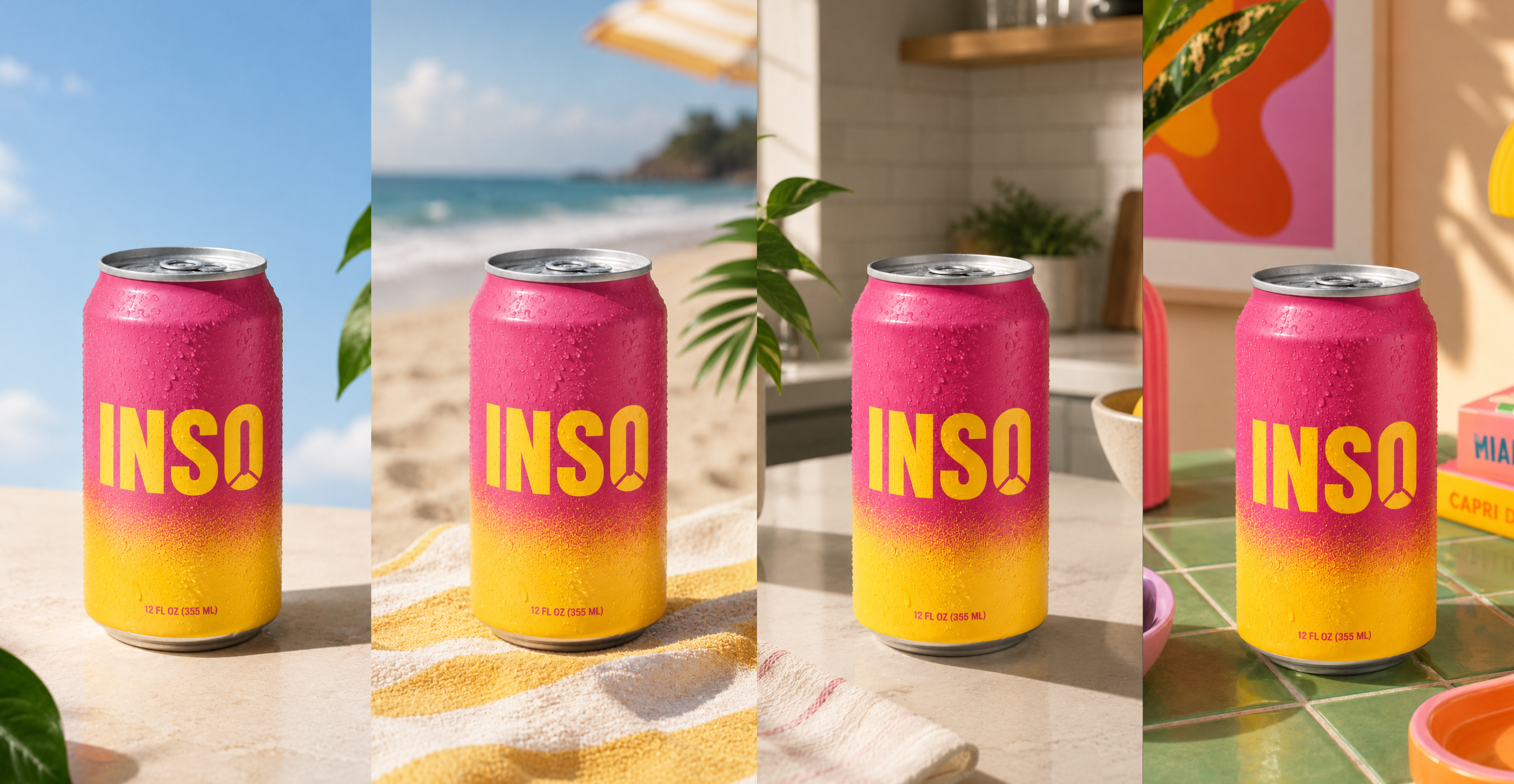
AI product photography has done to studio shoots what digital cameras did to film. Creating a handful of images is easy, but creating hundreds that stay on-brand is not. This guide covers how to create product images with AI safely, the best AI product photography tools and how Superside keeps product imagery on-brand at scale with custom AI image models.
Product photography has always been a trade-off. If you wanted distinctive, high-caliber images, you booked a studio, hired a crew and braced yourself for the bill. If you wanted affordable images fast, you reached for a stock library and accepted the hidden tax on what makes your brand stand apart. You could have quality and originality, or inexpensive convenience, but rarely both.
Now AI offers a third option. Today's generative tools let you create photorealistic, on-brand product images in minutes, at a fraction of the cost of a shoot, in as many variations as you need. You can visualize a product in a dozen settings before committing, localize imagery for every market and refresh a catalog continuously rather than once a year.
Product images are also decisive in ecommerce. Etsy found that 90% of shoppers say photo quality is "extremely important" or "very important" to their purchase decision, ranking it ahead of shipping cost, customer reviews and even price. Salsify's consumer research found shoppers expect around six images per product page, while top-selling Amazon listings averaged only three or four.
This combination of high stakes and relentless demand has created a production challenge traditional methods struggle to meet. It helps explain why Fortune Business Insights projects the AI image generator market to grow from about $484 million in 2026 to roughly $1.75 billion by 2034.
For brands, the question is no longer whether to use AI for product imagery, but how to use it well. That's what this guide covers.
(We firmly believe traditional studio photography still has its place. That's a topic for another day.)
Along the way, Alessio Perez, Associate Creative Director at Superside, shares what he sees when brands push AI imagery past the first few images.
What is AI product photography?
AI product photography involves using AI image-generation tools to create, enhance or edit product images. It can replace or supplement traditional photo shoots and stock imagery.
Brands can take two routes:
- Image generation. An AI model creates an image from a text prompt or reference images, placing the product in a new scene, setting or context.
- Editing. An AI model takes an existing product photo and changes the background, lighting, styling or format. This is how many ecommerce tools produce dozens of on-model or in-scene variations from a single flat-lay.
Both approaches sit atop the same AI image-generation capabilities powering the broader shift in AI graphic design.
Why brands are switching to AI product photography
Four advantages are driving the shift.
- Speed. A traditional shoot is a multi-week project of planning, sets, photographers and post-production. AI can generate product images within minutes and iterate the same day. For teams under constant pressure, that's a game-changer.
- Relatively low costs. With traditional methods, a simple ecommerce image can cost tens of dollars, while premium advertising photography runs into hundreds or thousands per image. AI can cut the cost of repetitive work by a large margin, which is why brands with big catalogs and small budgets are adopting it fastest.
- Scale and personalization. AI makes it easy to produce endless variations. Different backgrounds can be applied for different seasons, markets or customer segments. This kind of high-volume creative is exactly what enterprise omnichannel marketing demands and what a traditional shoot can't economically deliver.
- Testing and iteration. Because generation is cheap and fast, teams can visualize and test concepts before committing to a formal brief or shoot. Several Superside customers use their custom AI image models exactly this way.
AI product photography can turn product imagery from a scarce, expensive resource into an abundant, flexible one. The key is to avoid dissolving your brand into the same generic visual soup everyone else is swimming in.
Alessio Perez is clear that some products still belong in front of a camera.
Don't use AI product photography when the details are the main differentiator in the product. Jewelry, watches, a proprietary fabric, anything with a logo or small print people actually read before buying. And your big hero shot, the one everything else copies.

How to create AI product photos, a quick overview
Nobody produces good AI product images from one clever prompt typed in a fit of optimism. It's a process.
1. Prepare your input. Start with clean, high-resolution source material. For a custom image model, you typically need a set of strong, representative, on-brand reference images. For one-off generations, use a clear product image and a specific prompt.
2. Choose your approach. Decide between a general-purpose tool and a custom model trained on your brand. Off-the-shelf tools are great for quick, one-off needs. A custom model is what delivers consistency at scale. More on that below.
3. Prompt for accuracy. Product imagery lives or dies on detail. Prompts need to specify the product, setting, lighting, angle and mood precisely. Vague prompts produce off-brand images at best, and obvious AI slop at worst.
4. Add human judgment. Every generated image needs a human quality and brand check before it ships. AI can produce a slightly incorrect logo, an impossible reflection or an off-brand color, and only a trained eye reliably catches it. This isn't optional for brands, and it's a core reason AI creative quality control matters.
Perez has a quick way to check whether a batch is drifting off-brand.
Stop looking at AI photos as individual assets and start looking at them as parts of a system. Put them all on one screen, small, next to a few real brand shots. You'll spot it as a group before any single one looks wrong. Look at the light and the materials first.
Follow these steps well and you get usable, on-brand images. Skip the last two and you get the kind of slop that puts your brand reputation at risk.
The best AI product photography tools in 2026
A thriving ecosystem of AI product photography tools is now available, and for quick, self-serve needs many are genuinely good. Here's a map of the landscape, grouped by what each tool does best. Pricing and features move fast, so confirm the current details before you commit.
All-in-one ecommerce platforms
Photoroom

Photoroom describes itself as "the world's most popular AI photo editor," with the credentials to back it. Launched in 2019, it's been downloaded more than 150 million times with a 4.7-star rating from a million reviews.
An all-in-one platform built for ecommerce, Photoroom excels at background removal, staging, virtual models, batch processing and enterprise-level volume and speed.
Claid.ai

Claid.ai is an ecommerce-focused AI photo studio that emphasizes photorealistic quality.
Use it to place products into catalog and lifestyle scenes, turn a garment into professional on-model shots and transform still images into video clips. Its technology is trained on product photography and preserves logos, branding and product shapes, and it offers APIs for scalable image generation and video production.
Background and scene generators
Pebblely

Pebblely is a straightforward background and scene generator with plans running from $9 to $39 per month, and more than 100 templates plus custom prompts. There's no free tier, so budget for a paid plan from the start.
Flair.ai

Flair.ai is a user-friendly drag-and-drop studio for composing product scenes and on-model shots. It runs from a free tier up to around $38 per month, and lets you generate ads, build custom AI human models and manage brand assets in one place.
Pixelcut

Pixelcut is fast, simple and accessible, ideal for solopreneurs and small teams. One upload drops your product into studio or lifestyle scenes, it preserves logos and shapes, exports up to 4K and offers bulk tools plus an API. The tool you reach for when speed matters more than a tightly controlled enterprise catalog.
CreatorKit

CreatorKit offers unlimited free generations from hundreds of templates and charges only for the images you actually download, from $2.99 each. That pay-per-download model makes it a useful option for teams with small budgets.
SellerPic

SellerPic leads with fashion and apparel, offering AI fashion models and virtual try-on, though it also covers beauty, jewelry and home decor. Start with a single flat product photo and generate model photos, lifestyle shots, white-background images and social-ready content.
Catalog consistency
Nightjar

Nightjar is built specifically for catalog consistency at scale. Its own pitch says it best: one good image is easy, two hundred that look like they came from the same photoshoot is the actual problem.
The secret sauce? Once you have a setup you like, covering photography style, composition, model and scene, you save it as a "Recipe" and apply it to any new product in one click.
Specialist tools
Fibbl

Fibbl works differently from the rest of this list. You send physical product samples to its studio for 3D scanning, then one true-to-life 3D asset powers an interactive viewer, AR placement, virtual try-on, packshots and video. It's currently focused on footwear and bags, where fit uncertainty drives returns, so it's a returns-reduction play as much as an imagery one.
General and creative platforms
Adobe Firefly

Adobe Firefly's own models are trained on licensed Adobe Stock and public domain content, never on customer content, and are integrated into Photoshop and Express. That makes Adobe's models more comfortable for commercial use for many brands. Worth noting: the Firefly app now also hosts third-party partner models, which aren't Adobe-trained, so check which model you're using.
Canva

The AI Product Photos app is a decent option for early-stage sellers already working in Canva, sitting alongside your Brand Kit and templates. It's a third-party app rather than a Canva-built feature, and it's free on any Canva plan.
The big question: many of these tools can do a lot of the heavy lifting for a small team or a quick campaign. What happens, though, when you need not a few great images but a few hundred, all unmistakably on-brand, month after month, with experienced human oversight? That's next.
The limits of off-the-shelf tools, consistency and brand safety
One AI-generated image can look impressive. The real test is whether the thousandth still looks like the first.
With bigger batches, small inconsistencies creep in. Lighting shifts, product details change and the overall style begins to drift. By the time you apply your images across a full product catalog, the brand feels disjointed.
Perez says the mistake that actually wrecks a catalog isn't the one everyone expects.
Everyone worries about weird hands and extra fingers. The real problem is smaller stuff, material consistency mostly. The same product comes out a little different every time, slightly off color, off shine, off texture. One image, no big deal. But line up 200 of them for a library and it looks like nobody was in charge of QC.
Visual drift is a major risk with large off-the-shelf models. They don't inherently understand your visual identity. You have to provide brand context through prompts and reference assets, and even then results can be generic and off-brand.
Meanwhile, your brand's reputation is on the line. Getty Images found that nearly 90% of consumers globally want to know whether an image was created using AI, and 98% agree that authentic images and videos are pivotal in establishing trust.
Part of the reason a generic model drifts is what it has been trained on.
A standard AI model has seen your product, sure, but it's also seen the whole internet. So it guesses, it hallucinates, it adds stuff that shouldn't be there and removes stuff that's essential, a fake logo, a finish you don't even sell.
The bottom line is that sloppy, obviously AI-generated product images don't just look bad. They damage trust. Solving consistency, accuracy and brand memory is the whole ballgame, and it's what separates one-off AI images from a reliable system built into your workflow.
Real brand examples of AI product imagery
Big brands already use AI for product and campaign imagery in different ways. A few standouts.
H&M

In 2025, H&M started using AI-generated "digital twins" of 30 of its models in social and marketing imagery.
The models own the rights to their twins, must give permission for each use, can license them to other brands including competitors, and are paid every time a twin is used, at rates agreed through their agencies.
The initiative became a high-profile example of how brands can build consent, ownership and compensation into AI-powered fashion production.
Burger King

Burger King's "Million Dollar Whopper" campaign let customers design their own burger in the BK app, then used generative AI to turn each submission into a realistic-looking burger image and a personalized jingle they could share.
Three finalist burgers made it onto the actual menu, which is a neat lesson in connecting AI-generated imagery to something real.
Coca-Cola

Coca-Cola's 2023 "Create Real Magic" campaign invited digital artists to generate original artwork using the brand's iconic assets, including the contour bottle and Spencerian script logo, with selected work featured on digital billboards in Times Square and Piccadilly Circus.
Note: these examples show the breadth of what's possible, but they're big-budget, bespoke efforts. The more useful question for most brands is how to get reliable, on-brand product imagery at scale as an everyday capability.
A better way, AI product photography with Superside
Superside is the world's leading AI-first creative partner, built to deliver on-brand AI images at scale.
Our X-factor is a repeatable, on-brand system that plugs directly into your workflow, delivered through a dedicated AI-native team and powered by two things working together.
Custom AI image models

The first is custom AI image models.
Instead of using generic tools that guess, Superside builds a brand-trained model from a small set, typically 10 to 15, of your strongest and most on-brand images, so it reflects both a designer's eye and your brand's style.
From there, we train and test the model with you until it meets your quality standards. Once it's ready, a Figma plug-in and prompting tool make it easy for anyone on your team to generate on-brand images fast and affordably.
Perez describes the difference that training makes in day-to-day production.
Train it on your actual products and photos and it stops guessing. Way more consistent, way less to fix. Some post-production will always be needed, but it starts in a much better place.
The results are hard to ignore: 10x faster image creation, 75% less time per image and 85% cost savings per image.
Brand Brain inside Superspace
The second is your brand's own Brand Brain, the evolving intelligence layer at the center of Superspace, our AI-powered creative management platform.
Brand Brain captures what makes your brand recognizable, from brand guidelines and project context to past creative decisions, team preferences, historical data and feedback. It then applies that memory across every brief, review and creative interaction to keep work aligned from day one.
That brand intelligence also informs your custom image models and helps them generate fresh, on-brand product images in seconds, which means you can say goodbye to stock photography and expensive shoots for a large share of your imagery needs.
Unlike a static asset library, Brand Brain evolves with every project, capturing new feedback and decisions so consistency strengthens as you scale. That living memory is what prevents the brand drift common with generic tools.
Crucially, humans stay in the loop. Our creative experts direct and quality-check the work, combining AI-powered speed with the human judgment needed to deliver consistently high-quality, on-brand creative. Being AI-first means AI isn't just powering individual tools. It's embedded across the entire creative model, from how teams are trained to how brand knowledge compounds over time. That's the thinking behind our human-led, AI-powered approach: great creative still needs great creatives.
The proof is in our work

A few recent projects show what's possible.
Leading hand protection manufacturer Unigloves had a problem: its Derma Shield line, designed to prevent contact dermatitis, had no visual assets and no photography budget.
Superside generated 250 unique product and lifestyle images across five distinct scenarios, from a tattoo artist and a firefighter to a mechanic, a lab scientist and a make-up artist, and saved roughly 57% of the design hours a traditional approach would have required. The brand got a full campaign's worth of imagery without the price tag of a shoot.
Sailun Tire Americas, featured in our No-Hype AI Report, had previously relied on stock and brand photography. We created a concept board showing how AI models could evolve their brand photography, complete with examples of raw and post-produced output.
The brand team was impressed enough to approve AI for image generation going forward, and we delivered a custom Figma plug-in that generates on-brand images inside the platform, integrating directly into their creative workflows.
Their brand marketing manager describes how the model gets used now.
We've been using and loving our custom AI image model almost every day. One of the ways we use it most is to test and visualize ideas ahead of formal briefs.
Maven Clinic needed a high volume of fresh visuals for a rebrand but didn't have the time or budget for slow, expensive shoots.
Superside built a custom AI image model trained on Maven's new style and delivered a Figma plug-in the creative team now uses extensively across decks, marketing booklets and social content.
The pattern is consistent: a custom AI image model, delivered directly into the creative team's Figma workflow, backed by Brand Brain and human quality control, produces on-brand product imagery at a speed and cost no traditional shoot can match.
Is AI product photography legal and safe?
It depends on how you use AI. A few ground rules help.
- Use commercially safe models and licensed inputs. Some tools, such as Adobe's own Firefly models, are trained on licensed content specifically to make commercial use safer. Custom models trained on your own brand assets avoid the murkier questions around scraped content.
- Be transparent where it matters, since consumers increasingly want to know when imagery is AI-generated.
- Retain human oversight for quality, consistency and accountability.
- When you depict real people, get consent and compensate them properly, as H&M did with its digital twins.
Perez draws the line by what a wrong detail would actually cost.
Use AI for the high-volume stuff. Shoot the ones where a detail inconsistency directly damages brand equity, or where a wrong detail means a return or a legal problem.
Done conscientiously, AI product photography is both legal and brand-safe. Done carelessly, with generic models, no oversight and misleading depictions, it creates real risk. The difference is process, which is another argument for a governed, human-led approach.
AI product photography for marketplaces
Marketplaces like Amazon and Shopify have specific product image requirements.
AI workflows can help you meet those standards and produce clean, consistent, compliant main images plus richer lifestyle secondary images. But accuracy is mandatory. The image must truthfully represent the actual product.
This is why human review is essential, and why a custom model that keeps the product correct beats a generic one that might subtly reinvent it.
Always check each marketplace's current policy.
How to scale on-brand AI product photography

If you're just getting started, it makes sense to try a few self-serve tools to understand the basics and handle one-off needs.
But when product imagery becomes an ongoing, brand-critical requirement, a custom model, a workflow plug-in, a memory layer and human oversight become the best way to ensure consistency and quality at scale.
Sometimes off-the-shelf AI product photo tools are simply not enough for a team, and Perez says they tend to discover that the hard way.
It hits when they try to do it by themselves. One image looks amazing, so they go for it. Then they make a full batch, put it next to their real photos, and nothing matches. It's never the first image that wakes them up. It's the fiftieth.
That's the model Superside delivers: custom AI image models trained on your brand and a unique Brand Brain that keeps every output on point, delivered inside your creative workflow with expert human quality control on every asset. It's available through a dedicated team, a flex team or scoped projects, so it fits how enterprise teams actually buy.
The business case holds up too. A Total Economic Impact study commissioned by Superside and conducted by Forrester Consulting (April 2025) found that a composite organization achieved a 94% ROI over three years and $4.16 million in total benefits, with 60% fewer review rounds and the subscription paying for itself in six months.
If it's time to produce on-brand product imagery at the speed and scale modern marketing demands, book a call and let Superside become your creative team's creative team.
FAQs


Stuck in AI testing mode?
It’s time to move from experiments
to real impact.
Explore AI Reset—a 5-step framework
to embed AI into your creative workflows.

Ready to see it in action?
The best way to understand it is to experience it.
Because once your creative system has memory,
you won’t want to go back to starting from scratch.
$4.5M+ saved in creative costs in two years
Get real-world examples, results and insights
from over 5,000 GenAI-powered projects.
Your creative team's creative team
Choose the world's leading AI-powered creative service
and get high-performing ads, videos, experiences and
more at scale, on your schedule and to your standards.