



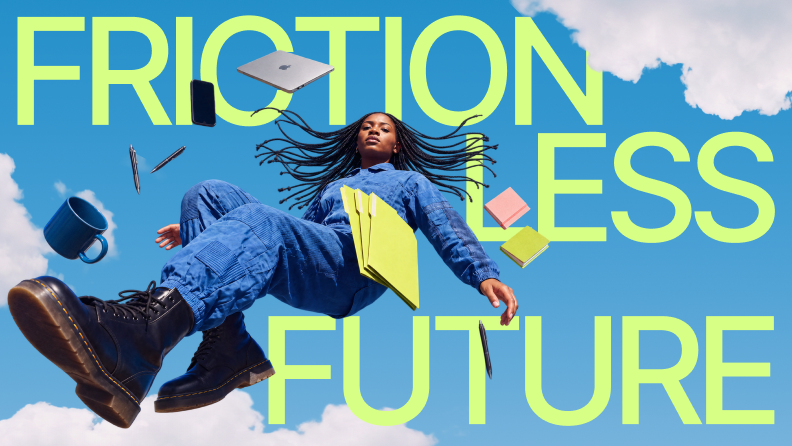




Typography in graphic design is the set of choices about typeface, size, spacing and placement that decide how text reads, and what it signals before anyone reads a word. A poster, an ad, a slide and a product label all carry text. The typography decides which line people see first, whether they can read the rest and what tone the whole piece takes.
The words stay the same in every version of a layout. The typography is what changes, and it's the part a designer controls.
What a designer controls
Eight settings make up most typographic decisions. Each one fails in a specific, visible way.
| Element | What it controls | What it looks like when it's wrong |
|---|---|---|
| Typeface | The design of the letters | A thin script set at caption size, where the loops fill in and the words turn to texture |
| Size | How large the type is, in points or pixels | A headline and a subhead set one step apart, so neither leads |
| Leading | The vertical space between lines | Descenders on one line touching ascenders on the next |
| Tracking | Even spacing across a whole word or line | Tracking so tight that "rn" merges into "m" and "modern" reads as "modem" |
| Kerning | Space between one specific pair of letters | A visible gap between the "T" and "o" in a large "Today" |
| Line length | How many characters fit on a line | Body copy running the full width of a desktop screen, so the eye loses its place on the return |
| Alignment | Where lines start and end | Justified text in a narrow column, opening rivers of white space down the paragraph |
| Contrast | How far the text stands apart from its background | Light gray body copy on white |
Typeface carries the tone. The other seven decide whether that tone ever reaches anyone.
What people mix up
Typeface and font. A typeface is the design: Helvetica, Garamond, Inter. A font is one specific style of it, such as Helvetica Bold. In metal type a font was a physical set of letters at one size. Most people now use the words interchangeably, and in conversation that's fine. In a brand guideline it isn't. "Use Inter" leaves the weight open, and the weight is where most of the inconsistency comes from. The page on typefaces in typography goes further into the distinction.
Kerning and tracking. Plenty of sources call kerning "letter spacing". It's not. Tracking changes the space across every letter in a selection by the same amount. Kerning changes the space between one pair, because some pairs, like "AV" or "To", leave awkward gaps at their default spacing. What is kerning covers the pair problem in depth, and kerning vs. letter spacing shows the two side by side.
Readability and legibility. Legibility is about single characters: can people tell a capital "I" from a lowercase "l" from the numeral "1"? Readability is about text in bulk: can they get through a paragraph without effort? A typeface can be perfectly legible and still produce an unreadable page if the lines are too long and the leading too tight. Legibility starts with the letterforms themselves, and x-height is one of the biggest factors. For faces built to be read at length, see the easiest fonts to read.
Where sources disagree. Some definitions treat typography as choosing a font and nothing more. Others count everything about how the text sits on the page: the grid, the line breaks, the space around a headline. The second definition is the one that holds up in practice. Two designers can use the same typeface and produce one layout that works and one that doesn't. Sources also split on serif against sans serif for body text on screens, an argument the page on serif fonts for body text works through.
How type works with color, imagery and space
Color. Color changes how heavy type looks. A bold weight in pale yellow reads lighter than a regular weight in black, so a hierarchy built in grayscale can fall apart once the brand colors go in. Check the hierarchy again after color is applied, not before.
Imagery. Text over a photo competes with every detail behind it. A headline across a busy street scene needs a solid panel, a gradient or a quieter crop. Making the type bigger doesn't fix it, because the problem is contrast, not size.
Space. White space around a headline gives it weight. A short headline with generous margins can lead a page without being the largest thing on it. That's how minimal layouts work: the space does the job that size does elsewhere.
Tone. A typeface carries associations before anyone reads it. A geometric sans reads as modern, and a high-contrast serif reads as editorial. Font psychology covers how those associations form. For headline-only faces built to carry tone, see display fonts.
How to build a type hierarchy
Hierarchy is the order people read things in. These steps work for a poster, a landing page or a slide.
- Pick one type family, two at most. One family with several weights gives enough contrast for most layouts. A second family earns its place only when it does a job the first can't, such as a display face for the headline.
- Set the body size first. Everything else scales from it. Choose it for the medium: a printed poster read from across a room needs a very different body size from a web page read at arm's length.
- Scale headings by a fixed ratio. With a 16 px body and a ratio of 1.25, the steps are 20, 25 and 31 px. A fixed ratio keeps each level clearly apart from the next, which ad hoc sizes don't.
- Set leading and line length. Long blocks of body copy need more leading than headlines do. For line length, Robert Bringhurst's The Elements of Typographic Style puts a comfortable measure for a single column of text at 45 to 75 characters, counting letters and spaces.
- Check contrast. The Web Content Accessibility Guidelines set an AA minimum of 4.5:1 for normal-size text against its background. Large text, 18 point or 14 point bold, has a minimum of 3:1.
- Test at the smallest size the design will appear. A hierarchy that works on a 27-inch monitor can collapse in a phone notification preview. Shrink the layout, or step back from it, and check that the first thing you see is the thing that should be seen first.
IMAGE PLACEHOLDER, replace before publishing. Image placement: type scale diagram. A body line at 16 px with three headings above it at 20, 25 and 31 px, each labeled with its size, showing the 1.25 ratio between steps. Flat, in the Superside palette. Alt text: "A type scale with body text at 16 pixels and headings at 20, 25 and 31 pixels, each step 1.25 times larger than the one below."
Before and after
A website header
Before: three typefaces in one header, pale text on a mid-tone background, center-aligned lines with uneven spacing between them. Nothing leads, and the header reads as a draft.
After: one sans serif in two weights, dark text on a light background, left-aligned with consistent spacing. The headline leads, the subhead follows and the button text is clearly the action.
A concert poster
Before: every line set in the same ornate script at the same size, with tight leading. From across the street it's a texture. The band name, date and venue all carry the same weight, so none of them carries any.
After: the band name in a bold display face at the largest size, the date and venue in a simple sans at a second size, and ticket details small at the bottom. The script survives as a single accent word. Someone walking past gets the band, then the date, then the place, in that order.
IMAGE PLACEHOLDER, replace before publishing. Image placement: concert poster, before and after. Left: all text in one ornate script at one size with tight leading. Right: the band name large in a bold display face, date and venue at a second size in a sans serif, ticket details small at the bottom. Flat, in the Superside palette. Alt text: "The same concert poster twice. On the left, all text is one size in an ornate script. On the right, the band name is largest, the date and venue are smaller and the ticket details are smallest."
When it matters and when it doesn't
Typography carries the most weight where people decide in seconds whether to keep looking. Posters, ads, packaging and the top of a landing page all fall in that group. A full-screen story ad gives someone a moment to take in the message. If the hierarchy doesn't land in that moment, the message doesn't land at all.
It carries less where people have already decided to read. In an internal report or a policy document, a clean default typeface and consistent heading levels do the job. The choice of face matters far less than whether every heading at the same level looks the same.
Some details only show at certain sizes. A loose kerning pair is obvious in a 120-point headline and invisible in 11-point body copy. Good kerning vs. bad kerning shows where pairs start to show. Line breaks work the other way. A single word stranded at the end of a paragraph goes unnoticed in a headline and stands out in a block of text, which is the widows vs. orphans problem.
For brand work, typography also has to hold steady across every asset a company produces. The importance of typography in branding covers that side.
FAQ
What is typography in graphic design?
It's the way type is chosen, sized, spaced and arranged in a design so the text is readable and carries the right tone. It covers the typeface and every setting around it, from leading to line length.
What are the basic elements of typography?
Typeface, size, leading, tracking, kerning, line length, alignment and contrast. Hierarchy is what you build when you combine them.
What's the difference between typography and fonts?
A font is one style of a typeface. Typography is the whole practice of using type, which includes choosing the font and everything you do with it afterward.
How many fonts should a design use?
One type family covers most designs, and two is a sensible ceiling. More than that, and the fonts start competing with each other instead of building a hierarchy.
Why is typography important in graphic design?
Because it decides what people read first and whether they read the rest. The same words in the same colors can work or fail depending on size, spacing and order alone.
Related reading
- The Importance of Typography — Discover why typography is a crucial design element in communication and branding.
- The Importance of Typography in Branding — Explore the pivotal role of typography in branding, understanding how font choices can shape perceptions, evoke emotions, and reinforce brand identity.
- Font Psychology: The Emotional Impact of Typography — Delve into the world of font psychology and discover how typefaces influence our perceptions and emotions.